 MGSV Modding Wiki
Create a Custom Mission
Contents
Contents:This guide will help you create an empty working mission. The mission should be packed using MakeBite (see this tutorial on how to use MakeBite).
For a ready-to-use template of everything explained on this page download the following zip, which can be used as a base to make any mission.
Creating the Mod Folder
There are two main folders for each custom mission, Assets and GameDir (Game Directory).

GameDir folder Setup
GameDir will have lua files that will act as the heart of our mission, it will add the mission’s core “area” pack. In order to support Infinite Heaven we need to set that lua file in a specific path.
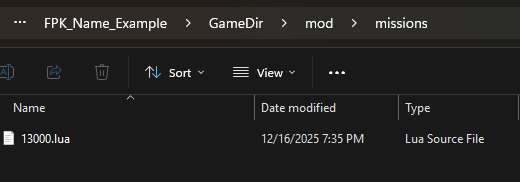
Lua file contents
This is as basic as an external lua can get, below the code, will check what each variable do.
local this = {}
    this.missionCode = 13000
    this.location = "AFGH"
    this.hideMission = false

    this.packs = function(missionCode)
        --Common packs:
        TppPackList.AddLocationCommonScriptPack(missionCode)
        TppPackList.AddLocationCommonMissionAreaPack(missionCode)

        --Mission pack (has to be last):
        TppPackList.AddMissionPack"/Assets/tpp/pack/mission2/custom_story/FPK_Name_Example.fpk"--The mission's core "area" pack
    end


    this.enableOOB = true --Enable out of bounds system (innerZone, outerZone, hotZone)
    this.missionMapParams={
        --Normal mission area zones as they appear on the iDroid
        --The actual in-game check traps are in .trap files.
        missionArea2 = {
            --Leaving the innerZone will only warn the player that they're leaving
            {
                name="trig_innerZone",
                vertices =
                {
                    Vector3(-58.000,315.000,1764.000),
                    Vector3(-238.000,321.000,2445.000),
                    Vector3(768.000,289.000,2486.000),
                    Vector3(653.000,353.000,1824.000),

                }
            }
            --Leaving the outerZone will actually trigger the mission clear/abort
            --Commented out as it will be be displayed alongside the innerZone otherwise
            --[[
            {
				name="trig_outerZone",
            	--.trap only:
				--minY=-213.1406,maxY=1299.037,
                vertices =
                {
                    Vector3(-58.000,315.000,1764.000),
                    Vector3(-238.000,321.000,2445.000),
                    Vector3(768.000,289.000,2486.000),
                    Vector3(653.000,353.000,1824.000),

                }
			},
			]]
        },
		--Hot zone as it appears on the iDroid
        safetyArea2 = {
			{
				name="trig_hotZone",
				vertices =
				{
                    Vector3(-58.000,315.000,1764.000),
                    Vector3(-238.000,321.000,2445.000),
                    Vector3(768.000,289.000,2486.000),
                    Vector3(653.000,353.000,1824.000),

				},
			},
		},
        missionStartPoint = {
            point = Vector3(418.33,278.22,2261.37),
		},
        heliLandPoint = {
    		{
                point=Vector3(418.33,278.22,2261.37),startPoint=Vector3(418.33,278.22,2261.37),routeId="lz_drp_field_I0000|rt_drp_field_I_0000"
            },
            {
                point=Vector3(141.47,275.51,2353.44),startPoint=Vector3(141.47,275.51,2353.44),routeId="lz_drp_fieldWest_S0000|rt_drp_fiieldWest_S_0000"
            },

		},
        -- Sortie/mission prep screen feature flags
        heliSpaceFlags = {
    		SkipMissionPreparetion = false,   --No sortie prep, like vanilla Mother Base.
    		NoBuddyMenuFromMissionPreparetion = false,    -- No buddy select in the sortie
   			NoVehicleMenuFromMissionPreparetion = false,    -- No vehicle select in the sortie
    		DisableSelectSortieTimeFromMissionPreparetion = false,    -- Only ASAP as deployment time option
  		},
    }


return this
missionCode
MissionCodes or missionIds are used in MGSV to identify missions in .lua and file names. Main missions fall into 6 main categories in 10k ranges.
Story: 10k
Extra: 20k
Free: 30k
Heli: 40k
Online: 50k
Shows/Select: 60k
The missionCode is seemingly stored as an unsigned short integer, so it runs out at its max value. Hard story missions (extreme, total stealth, subsistence) have a mission code 1k higher than the original mission.
Note for mission authors: Due to how the engine uses missionCodes must be unique for each mission. So if you are creating missions you should make sure you don’t conflict with existing ones, and update this page with the ids you intend to use.
Detailed information about missionCode
location
A string value location that is a part of the system that represents a map/playspace. For agiven location there may be one or more Missions.
See also Custom Locations List
Detailed information about Locations
hideMission
A boolean value that makes the mission hidden if set to true, it can be later opened using TppStory.SetMissionOpenFlag. Below is a full example of a module that opens a hidden custom mission.
It checks if that mission with the Uniqe missionCode 13105 has been cleared, if so open the other mission with the missionCode 13106
local this = {}

function this.Init(missionTable)
	if TppMission.IsFOBMission(vars.missionCode) then
		return
	end

    if TppStory.IsMissionCleard(13105) then
		TppStory.SetMissionOpenFlag(13106,true)
    else
        TppStory.SetMissionOpenFlag(13106,false)
	end
end

return this
Main Vanilla missions can also be checked if it’s clear, creating a unique story progression!
this.packs = function(missionCode)
This function will contain the packs that will be added for the mission.
This is as basic as it can get
this.packs = function(missionCode)
    --Common packs:
    TppPackList.AddLocationCommonScriptPack(missionCode)--[locationName]_script.fpk
    TppPackList.AddLocationCommonMissionAreaPack(missionCode)--enemies, heli, decoys, etc.

    --Mission pack (has to be last):
    TppPackList.AddMissionPack"/Assets/tpp/pack/mission2/custom_story/FPK_Name_Example.fpk"--The mission's core "area" pack
end
enableOOB
A boolean value that will enable out of bounds system (innerZone, outerZone, hotZone).
missionMapParams
A table that containts other tables that will have information about differnant things like the mission area, mission start point and heli land points.
missionArea2
Normal mission area zones as they appear on the iDroid, the actual in-game check traps are in a .trap file. Leaving it will only warn the player that they’re leaving.
More info about .trap.
You can get the coordinates using Infinite heaven by holding the Call Button and the Stance button.
 missionArea2 = {
     {
        name="trig_innerZone",
        vertices =
        {
            Vector3(-58.000,315.000,1764.000),
            Vector3(-238.000,321.000,2445.000),
            Vector3(768.000,289.000,2486.000),
            Vector3(653.000,353.000,1824.000),
        }
    }
     --Leaving the outerZone will actually trigger the mission clear/abort
     --Commented out as it will be be displayed alongside the innerZone otherwise
     --[[
     {
		name="trig_outerZone",
         vertices =
         {
            Vector3(-58.000,315.000,1764.000),
            Vector3(-238.000,321.000,2445.000),
            Vector3(768.000,289.000,2486.000),
            Vector3(653.000,353.000,1824.000),
         }
	},
	]]
 },
safetyArea2
Hot zone as it appears on the iDroid. Remember that this only affects it visually.
You can get the coordinates using Infinite heaven by holding the Call Button and the Stance button.
safetyArea2 = {
	{
		name="trig_hotZone",
		vertices =
		{
            Vector3(-58.000,315.000,1764.000),
            Vector3(-238.000,321.000,2445.000),
            Vector3(768.000,289.000,2486.000),
            Vector3(653.000,353.000,1824.000),
		},
	},
},
missionStartPoint
It sets where the player spawns if in Infinite Heaven, the option to start missions on foot is enabled. It it can take a single Vector3.
missionStartPoint = {
    point = Vector3(141.47,275.51,2353.44),
},
heliLandPoint
The landing zones that the player can select from the Idroid while in the ACC.
heliLandPoint = {
	{
        point=Vector3(418.33,278.22,2261.37),startPoint=Vector3(418.33,278.22,2261.37),routeId="lz_drp_field_I0000|rt_drp_field_I_0000"
    },
    {
        point=Vector3(141.47,275.51,2353.44),startPoint=Vector3(141.47,275.51,2353.44),routeId="lz_drp_fieldWest_S0000|rt_drp_fiieldWest_S_
    },
},
heliSpaceFlags
Sortie/mission prep screen feature flags
heliSpaceFlags = {
	SkipMissionPreparetion = false,   --No sortie prep, like vanilla Mother Base.
	NoBuddyMenuFromMissionPreparetion = false,    -- No buddy select in the sortie
	NoVehicleMenuFromMissionPreparetion = false,    -- No vehicle select in the sortie
	DisableSelectSortieTimeFromMissionPreparetion = false,    -- Only ASAP as deployment time option
},
And that’s everything you need to make it work, there are of course tons of other options that you can do. For example setting the GMP Reward when the mission is completed, or even how many Mission Tasks the mission has, but that of course needs extra steps.
missionGuaranteeGMP=600000,
Assets Folder
Assets folder contains… the mission’s assets, mainly the fpk, and it’s pair, the fpkd.
if you notice in the this.packs = function(missionCode) function, there was something called the The mission's core "area" pack.
First will create this, you can set any path you want, but it is recommened to set it in this path /Assets/tpp/pack/mission2/custom_story/.
Note: MakeBite will automaticlly repack any _fpk and _fpkd folders as .fpk and .fpkd, and will overwrite any existing ones.
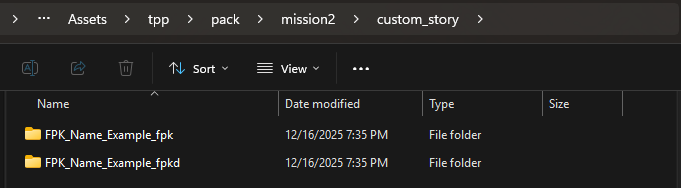
The path written in TppPackList.AddMissionPack must match what’s in the Assets folder.
So with the example we have above, it MUST look like this:
TppPackList.AddMissionPack"/Assets/tpp/pack/mission2/custom_story/FPK_Name_Example.fpk"
fpk
The _fpk folder will contain assets, like models, the routes that the GameObjectLocators will take… etc.
fpkd
The _fpkd folder will contain data, like fox2, effects and lua files that will controll everything with mission.
More info about that can be found in Mission Objectives and Mission Table Subscripts wiki pages.